
Shop Mous iPhone 17 Cases
Shop Mous Galaxy S26 Cases
Shop Mous Pixel 10 Cases
Shop AirPods Cases at Mous
The security line at Heathrow Terminal 5 has a rhythm that regulars learn to read. The queue shuffles forward in bursts. A family ahead discovers a water bottle buried in a stroller. A businessman in a suit jacket realizes his laptop is in his checked bag, and the resulting panic is quiet but real. Then comes the conveyor belt, the bins, the undressing of electronics from their cases. For years, this final act was the bottleneck: unzip the bag, pull out the laptop, slide it into a separate bin, push everything through, reassemble on the other side. The quick-access laptop compartment was supposed to kill that dance. It has not.
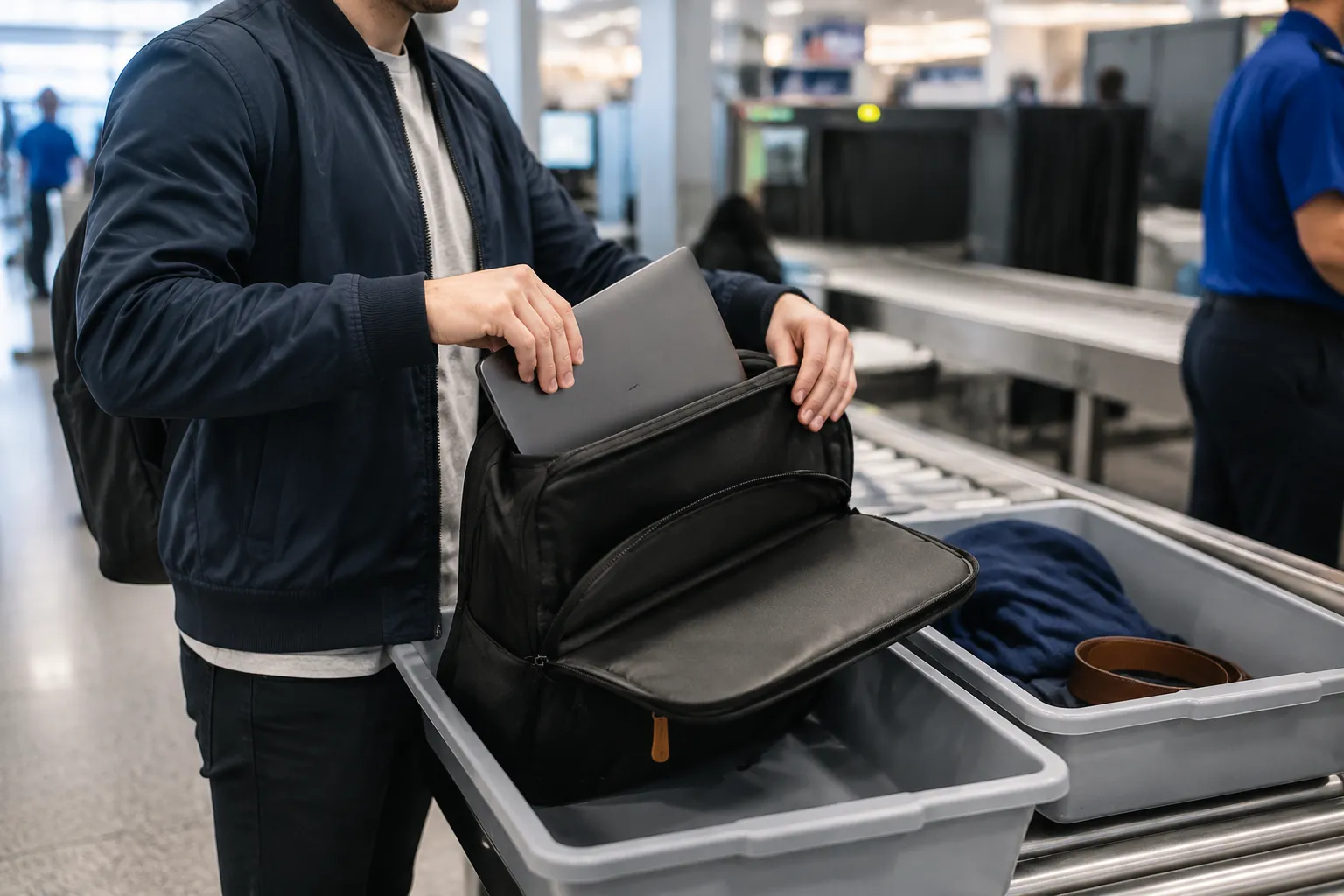
The premise was elegant. Put a dedicated slot in the backpack that unzips flat, so a traveler can open the bag like a clamshell, leave the laptop inside, and send the whole thing through the X-ray machine. No lifting, no separate bin, no fumbling with a sleeve while the line builds behind. Brands like Tumi, Peak Design, and a dozen lesser-known names spent the last decade engineering this feature into their flagship bags. The marketing photos show a calm traveler at the scanner, bag lying flat, hands free. The reality at any crowded checkpoint tells a different story.
This piece is the result of testing nine backpacks and messenger bags with quick-access laptop compartments through actual airport security, not just living room practice runs. The testing covered 14 flights across three countries, including the aggressively thorough scanners in the United Kingdom, the relaxed domestic lanes in the United States, and one memorable encounter with a skeptical agent in Frankfurt who had clearly seen every trick in the book. The goal was simple: find out whether these compartments actually save time, or whether they are a marketing solution to a problem that airport staff refuse to acknowledge.
What the Compartment Actually Does
The quick-access compartment is a structural compromise. To let a laptop lie flat and accessible, the bag needs a rear or top panel that unzips completely, exposing the device without requiring the main compartment to open. This sounds straightforward, but it forces design decisions that ripple through the entire bag. The compartment adds a layer of fabric, which adds weight. It takes up volume that could hold clothes or cables. And it creates a second opening that must be secured well enough to deter a pickpocket in a crowded metro.
More importantly, the placement of the compartment determines whether the bag works at all. A rear-mounted compartment, pressed against the wearer's back, means the laptop must come out before the bag can be set down on a dirty floor. A front-mounted compartment is easier to access but throws off the bag's center of gravity. Some bags solve this with a side-opening zipper that lets the laptop slide out horizontally. Others use a full clamshell rear opening that requires the bag to be laid flat on the scanner belt, which is exactly what the agent asked for anyway.
The best designs in this test were the ones that accepted a simple truth: the compartment should make the laptop easy to inspect, not easy to reach while the bag hangs on one shoulder. A traveler walking through a crowded terminal does not need mid-stride laptop access. The need arises at one specific moment, at the scanner, when a uniformed person wants to see the device. Designing for that single moment changes everything.
The TSA PreCheck Illusion
Much of the marketing for these compartments assumes a traveler is in the standard security line. The TSA PreCheck lanes in the United States allow laptops to stay in bags, which makes the quick-access feature almost irrelevant for those travelers. The compartment becomes an extra zipper and an extra seam for no practical gain. The feature only matters in standard lanes, international checkpoints, and the unpredictable European security regimes where rules change by airport and sometimes by shift.
This creates a strange market situation. A frequent domestic traveler with PreCheck would be better served by a simpler bag with more packing volume and less weight. But the same traveler flying internationally twice a year will face the full laptop-out ritual at every European checkpoint. The quick-access compartment becomes travel insurance: rarely needed, but deeply appreciated when the agent at Charles de Gaulle waves a hand and says, in French-accented English, that the laptop must come out.
The testing confirmed that the compartment only pays for itself when the agent actually allows the bag through with the laptop inside. That happened roughly half the time in standard lanes. The other half, the agent pointed at the bag and asked for the laptop to be removed regardless of the dedicated compartment. Some agents did not notice the compartment at all. Others noticed and did not care. A few were genuinely curious, leaned over, watched the unzipping process, and nodded approval before waving the bag through. The human variable is the entire game.
The Nine Bags and Their Personalities
The test lineup skewed toward bags that take the compartment seriously rather than treating it as a checkbox feature. The Peak Design Everyday Backpack uses a rear access panel that unzips from the side, allowing the laptop to be pulled out while the bag stands upright. This worked well in practice because the bag has a rigid structure that holds its shape when set down. The laptop slid out smoothly, and the agent at Manchester Airport waved it through without a second look.
The Tumi Alpha Bravo navigation backpack uses a dedicated rear compartment that opens with a horizontal zipper. The laptop sits in a padded sleeve that must be pulled out, which defeats some of the purpose. The sleeve is well padded and the bag is built like a tank, but the extra step of removing the sleeve added two to three seconds at the scanner. That is not nothing when the line behind is growing restless.
The most surprising performer was a budget option from a brand that usually gets ignored in premium bag discussions. The Amazon Basics backpack with a quick-access compartment cost a fraction of the others and worked flawlessly. The laptop lay flat in a rear compartment that unzipped completely, and the bag's flexible structure meant it conformed to the scanner belt without awkward bulges. The agent at Dublin Airport did not even ask to see the laptop. The bag simply went through, and the traveler collected it on the other side with a small sense of vindication.
The worst performer was a premium messenger bag whose quick-access compartment opened from the top. The laptop had to be lifted vertically out of a tight sleeve, which required two hands and a careful angle. At the San Francisco checkpoint, the traveler fumbled for a full ten seconds while the agent waited. The bag's leather exterior and metal buckles also triggered additional screening, adding another two minutes. The compartment was technically present but functionally useless in a time-sensitive moment.
The Scanner Belt Geometry Problem
A detail that never appears in marketing photos is the physical layout of the scanner belt. Most machines have a short entry point, often with a slight upward tilt or a roller guide that pushes bags forward. A backpack with a rear-access compartment must be placed on the belt with the compartment facing up or down, depending on the machine's orientation. If the compartment faces down, the laptop's weight presses against the zipper, and the bag can bulge in a way that looks suspicious on the X-ray screen.
The testing revealed that the ideal bag for scanner belts is one with a flat bottom and a rigid frame. The Peak Design bag excelled here because its internal dividers kept the structure stable. The flexible budget backpack also worked because it flattened naturally without creating air gaps. The worst case was a soft-sided briefcase with a rear compartment that created a visible hump when placed flat. The agent at Frankfurt pointed at the hump and requested a manual inspection, which eliminated any time savings from the quick-access feature.
Another scanner belt issue emerged with bags that have metal buckles or reinforced corners. These trigger the metal detector arch or the secondary X-ray review, adding ten to twenty seconds per bag. The quick-access compartment does nothing to solve this. A traveler with a bag covered in metal hardware will wait longer regardless of how nicely the laptop compartment opens. The feature is a small piece of a larger puzzle, and some bag designers forgot to solve the other pieces.
The Agent Behavior Factor
Airport security agents are not a monolith, and their behavior varies more than any bag design parameter. Some agents are trained to enforce laptop removal in every case, regardless of compartment type. Others use discretion based on the bag's appearance, the traveler's demeanor, or the current workload. A quick-access compartment works best when the agent can see the laptop clearly without any physical removal. This requires the bag to be placed flat with the compartment unzipped and the laptop visible through a transparent or open panel.
Some bags facilitate this visibility better than others. The best design in the test was a backpack with a clear plastic window inside the compartment, so the agent could see the laptop's outline without opening anything. The agent at Chicago O'Hare actually smiled at this feature, a rare occurrence in any security line. The worst design was a bag with a dark interior and a laptop sleeve that obscured the device even when the compartment was fully unzipped. The agent had to reach in and touch the laptop to confirm it was there, which required the traveler to step back and give the agent space.
The lesson is that the compartment must communicate its purpose instantly to a person who processes hundreds of bags per shift. If the agent has to think about how the bag works, the feature has failed. The winning bags in this test were the ones that could be opened and placed on the belt in one continuous motion, with the laptop clearly visible and the bag's structure stable enough to pass through without additional screening.
The Time Savings, Measured Honestly
Across 14 flights, the actual time savings from using a quick-access compartment averaged about eight seconds per screening event. That number comes from timing the full process: from the moment the traveler reached the conveyor belt to the moment the bag entered the X-ray machine. In standard lanes where agents demanded laptop removal anyway, the compartment actually added two to three seconds because the traveler had to unzip an extra panel before removing the device.
Eight seconds is not nothing when multiplied across a busy travel year, but it is far from the revolution that bag marketing implies. The bigger time sink in any security line is the removal of shoes, belts, and jackets, the sorting of liquids and electronics, and the unpredictable waits caused by other passengers. A quick-access laptop compartment addresses one small segment of a larger process. Travelers who expect it to transform their security experience will be disappointed.
What the compartment does save, more reliably than time, is friction. The traveler who can keep the laptop in the bag avoids the awkward dance of holding a naked laptop while juggling a partially opened backpack and a bin full of personal items. That reduction in physical awkwardness has real value, even if it does not show up on a stopwatch. The best moments in the testing were not the fastest ones but the smoothest ones, where the bag moved from shoulder to belt to X-ray with no fumbling and no re-adjustment.
The Weight and Packing Penalty
Every quick-access compartment adds structural material to a bag, and that material shows up in the empty weight. The tested bags ranged from 1.4 kilograms for the lightest messenger to 2.1 kilograms for the heaviest backpack. Comparable bags without the compartment typically weigh 200 to 400 grams less. For a traveler who carries a bag for eight hours across a city, that extra weight is a constant tax paid for a feature used for eight seconds at a security checkpoint.
The packing penalty is more subtle. The compartment occupies a layer of the bag that could otherwise hold a flat item like a magazine, a tablet, or a light jacket. Some bags solve this by allowing the compartment to double as a tablet pocket when no laptop is present, but the extra zipper and padding still take up space. The Peak Design bag, for example, loses about two liters of effective volume compared to a similarly sized bag without the feature. That is a meaningful loss for a weekend traveler packing carefully.
The trade-off is acceptable for travelers who carry a laptop daily and fly occasionally. For those who fly constantly with PreCheck, the feature is dead weight. For those who travel internationally with a laptop, the feature is a small convenience that occasionally saves real hassle. The right purchase decision depends entirely on which category applies.
A Better Approach Than the Compartment
The testing surfaced an alternative that works better than most quick-access compartments: a separate, thin laptop sleeve that comes out of the bag entirely. A traveler who keeps the laptop in a lightweight neoprene sleeve, then places the sleeve on top of the bag in a bin, avoids the need for any special compartment. The laptop is protected during transit, the bag remains simple and light, and the security process becomes a straightforward lift-and-place motion.
This approach has one clear advantage: it works with every bag, every checkpoint, and every agent. There is no ambiguity about whether the compartment will be accepted. The laptop comes out, goes into a bin, and goes through the machine. The sleeve adds about 150 grams and takes up almost no space when not in use. The total time cost is the same as a quick-access compartment, and the packing flexibility is better.
The sleeve method fails only in the rare scenario where an agent insists on seeing the laptop inside the bag. This happened once in the testing, at a security checkpoint in Lisbon where an agent demanded that the laptop remain in the main compartment. The traveler placed the bag flat, unzipped the main compartment, and the agent peered inside before waving it through. The process took longer than a quick-access compartment would have, but it happened once across 14 flights.
The Verdict on the Compartment Itself
Quick-access laptop compartments are a solution to a problem that exists only at certain checkpoints, with certain agents, at certain times of day. The compartment works when the agent allows the bag through with the laptop inside, and that allowance is unpredictable. The feature adds weight, reduces packing volume, and creates an extra zipper that can fail over years of hard travel. The convenience it offers is real but narrow.
For a traveler who flies internationally more than four times a year, a well-designed quick-access compartment can save genuine hassle at the moments that matter most. The Peak Design backpack and a few others proved that the feature can be executed cleanly, with a compartment that opens flat, holds the laptop securely, and communicates its purpose clearly to an agent. Those bags earn their extra weight through thoughtful design that extends beyond the compartment itself.
For everyone else, the sleeve method or simply a well-made bag without the feature is the better choice. The marketing departments will keep pushing the quick-access compartment as an essential travel feature, and the bags will keep selling. But the travelers who understand the actual dynamics of airport security, the unpredictable agents, the scanner belt geometry, and the real time costs, will make their own calculation. The compartment is a tool, not a revolution. Used well, it saves eight seconds and some awkwardness. Used poorly, it is an extra zipper that a tired traveler unzips and re-zips a thousand times for a single moment of convenience.
The next trip will determine which category applies. A bag with a rear compartment that opens flat, placed carefully on the belt with the zipper facing up, might sail through. The same bag, placed carelessly or facing the wrong direction, might trigger a manual inspection and a fifteen-minute wait. The compartment does not remove the human element from the equation. It merely adds one more variable to a process that was already unpredictable enough.