
Shop Mous iPhone 17 Cases
Shop Mous Galaxy S26 Cases
Shop Mous Pixel 10 Cases
Shop AirPods Cases at Mous
Most people buy a laptop sleeve like they buy a phone charger: in a hurry, from whichever brand is nearest, with almost no thought to how it will feel eight months later. The sleeve becomes an afterthought, a padded envelope that lives at the bottom of a bag. But for a commuter, the sleeve is not an envelope. It is the difference between carrying a brick and carrying a tool. The right one protects the machine from the particular violence of a crowded train car or a bus that brakes too hard, and it does so without adding the kind of weight and bulk that makes a person dread the walk from the platform to the office.
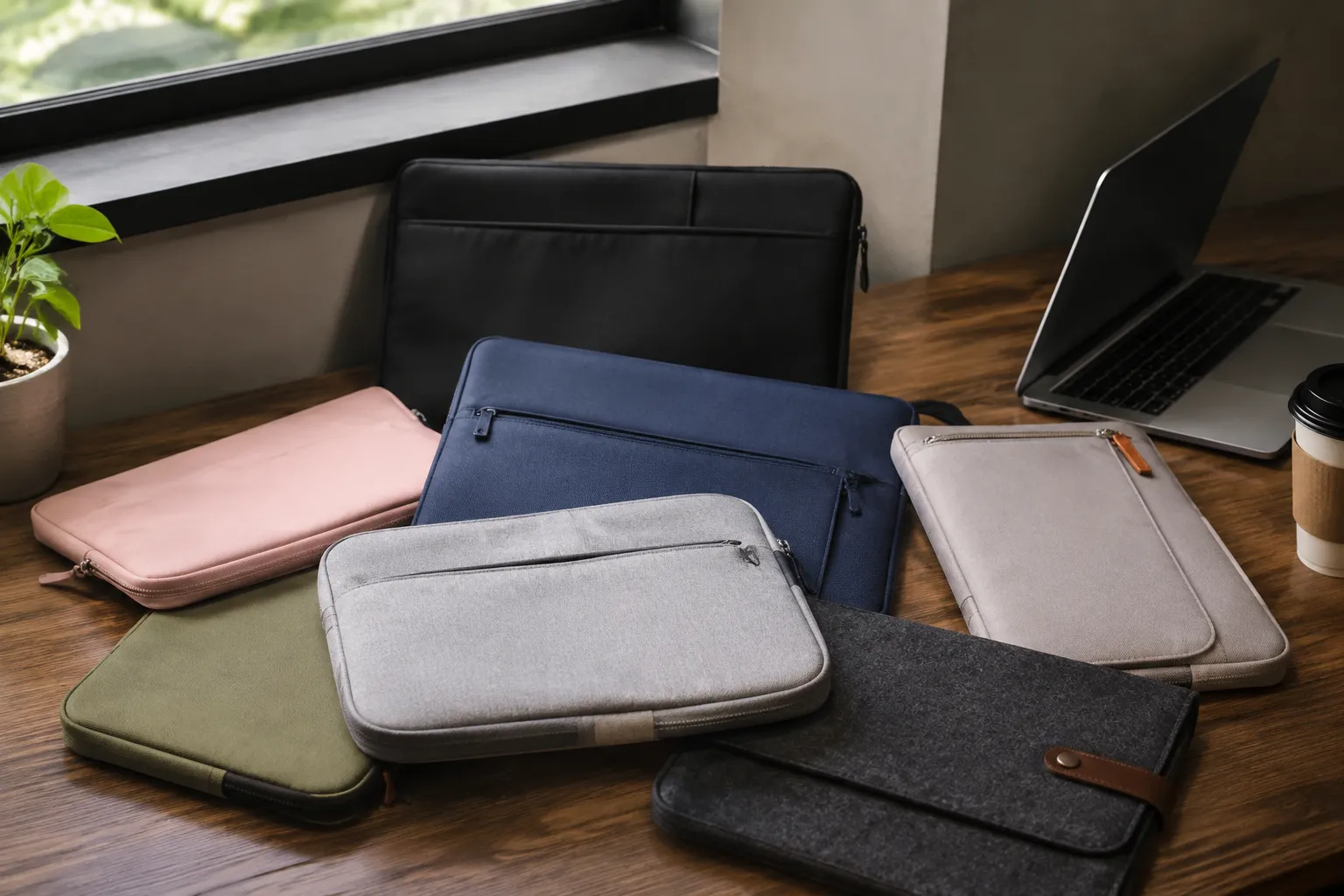
The commuter sleeve market is crowded with options that look identical in a product photo and feel completely different in hand. Some are glorified neoprene pouches that offer the protection of a wet sock. Others are rigid armored cases that make a slim laptop feel like a piece of luggage. The good ones sit in a narrow middle ground, and they do not need to cost a fortune. Here are seven sleeves that respect both the machine inside and the budget of a person who rides transit daily.
The Felt Case That Actually Fits the Bag
The wool felt sleeve from Harber London is the one that people discover after they have already wasted money on two cheaper options. It is not cheap at around sixty dollars, but it is also not the hundred-plus price tag that the brand charges for its leather goods. The felt is thick, about a quarter of an inch, and it has a density that feels more like a firm mattress than a fabric. A laptop slides in and sits there, cushioned from the sides and bottom by a material that absorbs shock without adding any rigidity.
What makes it right for a commuter is the slim profile. At its thickest point, the sleeve adds less than half an inch to the laptop's dimensions, which means it drops into a backpack's laptop compartment or a tote's main pocket without becoming a separate object that needs its own space. The felt also does something that synthetic materials rarely do: it gets better with wear. A few months of rubbing against keys and bag interiors gives it a soft patina, and the edges soften rather than fray.
The only real complaint is the closure. It uses a simple flap with no magnetic snap or zipper, just the flap tucking into the front. That is fine for a bag that stays upright, but it is not the sleeve to choose for a messenger bag that gets tossed onto seats and floors at odd angles.
A Reinforced Option for the Brutalist Commute
For the person whose commute involves a folding bike, a crowded subway car, or a bus route that treats potholes as optional obstacles, the tomtoc A13 sleeve is the pragmatic pick. It sells for around twenty-five dollars, which feels like a mistake given what it does. The exterior is a 1680D ballistic nylon that shrugs off scrapes and light rain, and the interior is a plush lining that will not scratch a laptop's finish. The padding is the key feature: it is a honeycomb structure, roughly a centimeter thick, that compresses under impact and springs back.
This sleeve has a proper YKK zipper that runs the full length and tucks away into a small pocket at the top, so it does not scratch the laptop when sliding in or out. There is also a front pocket that fits a charger and a few cables, which is rare in a sleeve at this price. Many sleeves in this range skip the pocket entirely, forcing a person to carry the charger loose in the bag, where it inevitably presses against the laptop's screen.
It is not a beautiful object. The design is functional, the branding is minimal, and the color options are basic black and gray. But beauty fades when a laptop survives a fall from a seat onto a metal floor. At this price, the tomtoc is the one to buy when the commute is genuinely hostile to electronics.
The Leather Sleeve That Does Not Scream Corporate
Anyone who wants a leather sleeve has probably looked at the options from brands like Bellroy and felt the sticker shock. A genuine leather sleeve from a reputable maker usually starts around eighty dollars and climbs quickly past one-fifty. The Waterfield Designs Bolt Sleeve sits at the higher end of that range, but it earns the price in a way that a mass-market option cannot.
The Bolt uses a waxed canvas exterior with leather trim, which gives it the aesthetic of a heritage bag without the maintenance demands of full leather. The interior is a soft microfiber that does not leave lint on a laptop's surface. The closure is a magnetic snap that is strong enough to stay shut but easy enough to open one-handed while holding a coffee in the other. That detail matters more than it sounds. A person standing in a crowded aisle, balancing a bag and a drink, does not want to fiddle with a buckle or a zipper pull.
Waterfield makes these sleeves in San Francisco, and the construction quality is visible at the seams and the stitching. The sleeve will outlast the laptop it currently holds. It is the kind of purchase that feels expensive in the moment and reasonable across five years of daily use.
The Sleeve That Doubles as a Work Surface
Commuters who work from coffee shops or shared desks before and after the ride face a specific problem: where to put a laptop that is hot from use and needs to rest on a surface that might be sticky, dusty, or worse. The Twelve South BookArc sleeve, marketed as the Journey, solves this with a fold-flat design that is more than a sleeve.
The Journey is a padded folio that unfolds into a flat mat. A person can slide the laptop out, flip the sleeve open, and use the interior surface as a clean desk pad. The material is a ballistic nylon with a soft backing, and it provides a stable, non-slip base for typing. The front pocket holds a charger, a mouse, and a notebook, which turns the whole thing into a mobile workstation rather than just a protective layer.
It is heavier than a standard sleeve, around a pound, and it does not fit well into a laptop compartment that is already tight. The Journey wants to be the bag's main occupant, or it wants a backpack with a generous main compartment. For a person who carries a dedicated work bag, this sleeve replaces the need for a separate laptop bag and a desk organizer. That consolidation is worth the extra weight.
The Budget Pick That Belongs in the Conversation
Every roundup needs a budget option that is not just the cheapest thing on the shelf but a genuinely good product. The Amazon Basics Sleeve, at around fifteen dollars, is that option, with a caveat. The exterior is a polyester fabric that will not win any design awards, and the padding is adequate rather than exceptional. But for a laptop that stays mostly on a desk and only commutes a few days a week, it does the job.
The sleeve has a zippered closure, a slim profile, and nothing else. No pockets, no handles, no extra features that add bulk or cost. It is the plain white t-shirt of laptop sleeves. The interior is a soft faux-fleece lining that will not scratch, and the fit is snug enough that the laptop does not slide around inside. It comes in several sizes, and the sizing is accurate, which is less common than it should be at this price point.
The honest assessment is that this sleeve protects against scratches and light bumps, not drops. A person who stuffs the laptop into an overstuffed backpack and throws the bag onto a hard floor will find the protection lacking. But for the commuter who carries a separate bag or uses a backpack with its own padded compartment, the Amazon Basics sleeve is a perfectly rational choice that leaves money in the budget for a better bag.
The Neoprene Sleeve That Finally Got It Right
Neoprene sleeves have a bad reputation, and it is deserved. Most are thin, flimsy, and stretch out after a few months until the laptop wobbles inside like a loose tooth. The Mosiso sleeve, a few dollars under twenty, is the exception because it uses a thicker neoprene and a seam construction that does not unravel at the edges.
The Mosiso's key feature is its interior. The lining is a soft, brushed microfiber that feels closer to chamois than the slippery polyester that most neoprene sleeves use. A laptop slides in smoothly and stays put, thanks to a snug fit that leaves almost no room for shifting. The exterior has a subtle diamond pattern that adds grip, so the sleeve does not slide off a smooth counter or a train seat.
It also comes with a separate pocket that attaches to the front, giving it a two-piece design that is unusual at this price. The pocket fits a charger and a couple of cables, and it zips closed. The whole package is still lighter than a padded fabric sleeve, which makes it the right choice for a minimalist who wants the smallest footprint possible.
The trade-off is style. Neoprene looks like wetsuit material, because it is. It does not dress up well. A person walking into a client meeting with a neoprene sleeve under an arm will look like they are carrying gym gear. For that reason, the Mosiso is best for the commute itself, with the sleeve staying inside a bag rather than serving as a standalone carry.
The Slim Sleeve for a Machine That Never Leaves the Bag
Some laptops never need a standalone sleeve because they live their entire lives inside a backpack or a messenger bag. For that user, the only job of a sleeve is to stop the laptop from getting scratched by the other contents of the bag and to provide a minimal layer of dust protection. The Inateck sleeve, at around thirteen dollars, is built for exactly that role.
It is thin, almost to the point of feeling insubstantial when held in one hand. The padding is a light foam that adds maybe a quarter-inch of thickness. Dropping this sleeve onto concrete would not do much to protect the laptop inside. But that is not its purpose. Its purpose is to sit in a backpack's laptop compartment, where the bag's own padding provides the real protection, and to keep keys, pens, and loose change from gouging the aluminum.
The Inateck has a zippered closure and a small handle at the top, which is useful for pulling the sleeve out of a deep bag without fishing around. It comes in a range of sizes that fit everything from a 13-inch ultrabook to a 17-inch workstation. For the price, it is the sort of purchase that a person makes without thinking and then forgets about, which is exactly what a sleeve should be.
What Holds Up After a Year of Daily Carries
After a year of rotating through these options, the patterns become clear. The felt sleeve from Harber London develops a worn-in softness that makes it the most pleasant to handle, but the flap closure means it is best for a bag that stays upright. The tomtoc takes the most abuse and shows it the least, and the ballistic nylon exterior does not pill or fray the way cheaper synthetics do. The Waterfield sleeve looks better after a year than it did on day one, as the waxed canvas develops a subtle sheen and the leather trim darkens with handling.
The budget options do not fall apart, but they also do not improve. A year of rubbing against bag interiors leaves the Amazon Basics sleeve looking slightly tired, with a few loose threads at the zipper seam that require a quick snip with scissors. The neoprene Mosiso holds its shape, but the exterior picks up lint and dust that requires regular wiping. Neither fails in a way that would put a laptop at risk, but neither earns affection either.
The real lesson is that a sleeve is a consumable item with a lifespan tied to the laptop it protects. When the laptop gets replaced, the sleeve should get replaced too, because a sleeve that fit a previous machine will always be slightly wrong for the next one. The felt sleeve stretches, the padded sleeves compress, and the fit that felt snug on day one feels loose by month eighteen. Budget for a new sleeve with every new laptop, and the protection will stay consistent instead of degrading silently.
The right sleeve is the one that is forgotten during the commute and remembered only when the laptop is pulled out, clean and undamaged, ready for the day's work. That quiet reliability is worth more than any feature list, and it is available at every price point in this list.