
Shop Mous iPhone 17 Cases
Shop Mous Galaxy S26 Cases
Shop Mous Pixel 10 Cases
Shop AirPods Cases at Mous
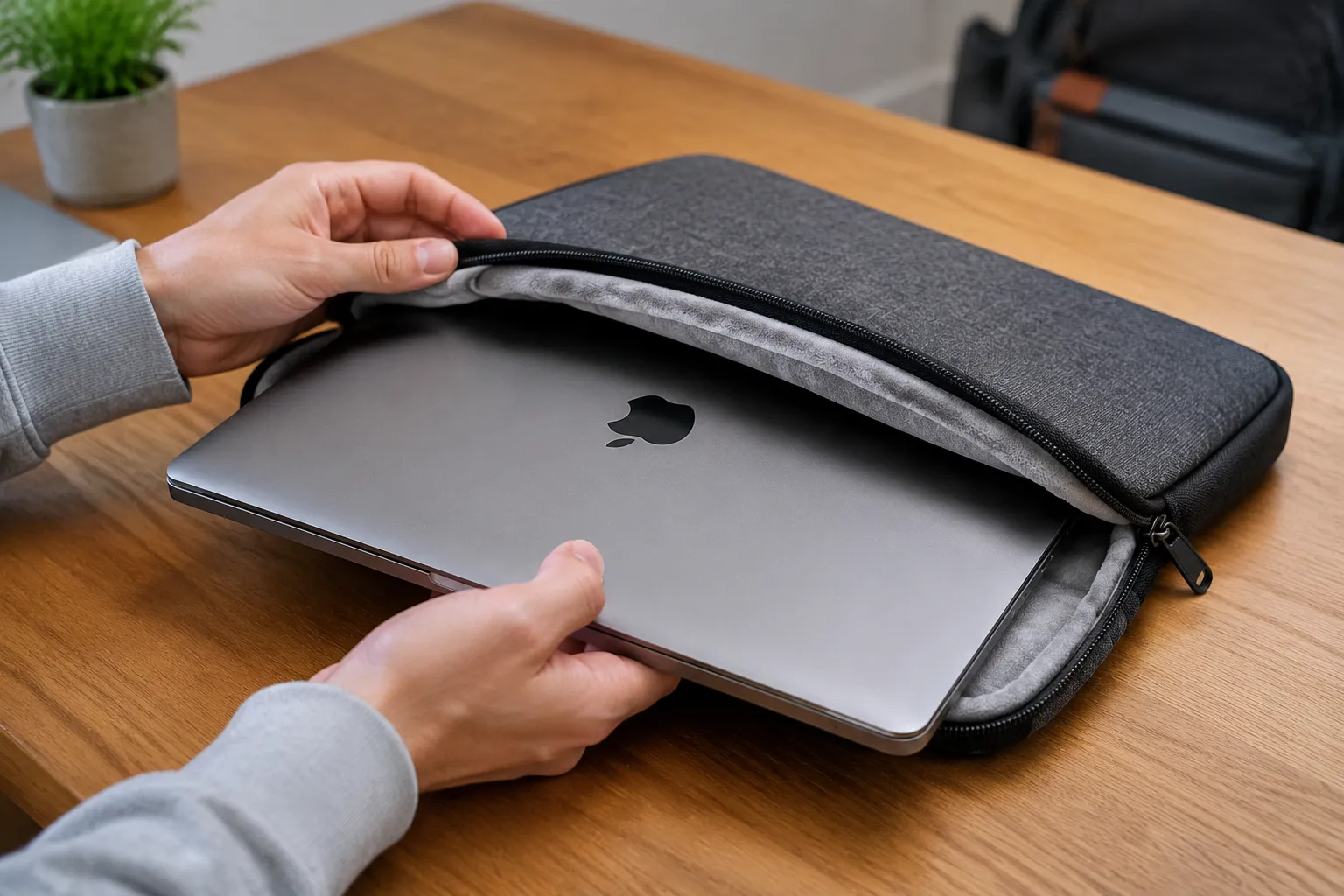
The MacBook Air M2 has a tolerance for abuse that its owners do not share. The aluminum unibody can shrug off a knock that would put a crack in a plastic Ultrabook, but the screen is a different story. One stray corner impact, one drop onto a table edge, and the display becomes a web of dead pixels that turns a $1,200 laptop into a $600 repair bill. That is the entire case for a drop-protected sleeve: not scratch defense, not dust cover, but actual impact absorption for the one component that cannot survive a fall.
The category has grown crowded with options that claim military-grade protection while offering little more than a padded envelope. The real differentiators are corner reinforcement, lid-edge coverage, and how the sleeve handles the M2's specific geometry. The Air M2 has a slightly tapered profile, thinner at the front edge than the back, which means generic sleeves built for the older wedge design often fit sloppily. A sleeve that shifts around inside a bag is a sleeve that lets the laptop find the floor.
Three materials dominate the serious end of this market: closed-cell foam, EVA shell, and multi-layer neoprene. Each one trades impact protection against bulk and weight in a different way. The best choices balance all three without pretending a laptop sleeve is a hard case.
The Drop Test Reality Check
Every manufacturer claims a drop standard now. MIL-STD-810G gets thrown around like confetti, and most of it is marketing theater. The military standard is a set of test conditions, not a pass-fail certification, and companies get to choose which tests they run and at what intensity. A sleeve that survived a 4-foot drop onto plywood in a lab tells a person nothing about what happens when the bag slips off a café table onto a tile floor.
The honest way to evaluate drop protection is to look at the architecture. Corners matter most because they hit first in a typical fall, and the energy concentrates in a small area. A sleeve with continuous foam padding but no corner reinforcement will transfer that impact straight through to the aluminum chassis. The M2's screen glass extends nearly edge to edge, leaving almost no bezel to absorb a corner strike.
A second consideration is the closure system. Zippers sit directly over the laptop's top edge in most sleeve designs, and the zipper track is often the least padded part of the whole product. When a sleeve lands zipper-side down, the metal teeth can press into the laptop's lid with surprising force. Some manufacturers recess the zipper into a padded channel; others place it along the side seam where it never crosses the screen area.
The third factor is fit. A drop-protected sleeve that fits loosely defeats its own purpose. The laptop needs to stay put inside the sleeve so that the foam, not the laptop's own momentum, absorbs the impact. Interior friction lining helps, as does a snug cut that matches the M2's 11.3 by 7.8 inch footprint and its 0.44 inch thickness at the rear.
EVA Shell Cases: The Protection Ceiling
EVA (ethylene-vinyl acetate) shell cases represent the maximum protection available in a sleeve form factor. These are the clamshell designs that look almost like a lunch box for a laptop, with a rigid outer shell and a soft interior cradle. The hard exterior distributes impact energy across a wide surface area before it reaches the laptop, which is exactly what a corner drop requires.
The Moft Snap Stand Sleeve is one of the few EVA options designed specifically for the M2 Air rather than adapted from a generic 13-inch template. Its shell is thin but rigid, and the interior has a microfiber lining that grips the laptop's surface. The clever part is a fold-out stand integrated into the back panel, which converts the sleeve into a viewing stand at a coffee shop or desk. The tradeoff is weight: at nearly a pound, it adds noticeable heft to a bag.
Another strong EVA contender is the tomtoc A13, which uses a harder outer shell on the corners and a softer middle section. That corner-first design philosophy shows up in the product's structure: the reinforced corners are visibly thicker, and the zipper runs along the top edge with a padded flap covering it. The interior holds the M2 snugly with no play, and the whole thing measures under an inch thick, which keeps it within the "slim" promise of the category.
EVA cases have a weakness beyond weight: they do not flex. A rigid shell that takes a hard hit can crack, and once the shell cracks, the protection drops to near zero. Most manufacturers use a semi-rigid EVA blend that bends slightly under pressure without permanent deformation, but a truly hard drop onto concrete can exceed that limit. For people who toss their bag into overhead bins and car trunks without thinking, the rigidity is worth the risk. For gentler commuters, it is overkill.
Closed-Cell Foam: The Everyday Sweet Spot
Closed-cell foam sleeves sit in the practical middle of the market. These are the padded envelopes that most people picture when they hear "laptop sleeve," but the quality varies enormously. The cheap versions use a thin layer of foam that compresses to nothing on impact. The good ones use a dense, high-rebound foam that absorbs a blow and returns to shape.
WaterField Designs, a San Francisco maker that has been sewing bags since the PowerBook era, produces the most refined foam sleeve for the M2. The Shields Up sleeve uses a layered construction: a waxed canvas or ballistic nylon exterior, a closed-cell foam core, and a plush interior lining. The foam is thick enough to feel substantial but not so thick that it turns the sleeve into a pillow. A magnetic closure replaces the zipper entirely, which eliminates the zipper-as-impact-point problem and makes the sleeve quieter to open and close.
The WaterField approach has a specific weakness: the open top edge. A magnetic flap covers the opening, but if the sleeve lands open-side down, the laptop can slide out partway before the flap reseats. In practice, the interior friction lining holds the M2 firmly enough that this rarely happens, but it is a theoretical gap in protection that zippered sleeves do not share.
For a budget alternative, the Bellroy Laptop Sleeve uses a similar foam construction with a recycled PET shell and a felt-like interior. The foam density is lower than WaterField's, so a hard corner hit transmits more energy, but the sleeve is also thinner and lighter. It measures about 0.6 inches thick with the laptop inside, which slides into a backpack's laptop compartment without a fight.
What the Slim Promise Actually Means
"Slim" gets thrown around loosely in this category. A sleeve that adds two inches of foam padding to every side is slim only by comparison to a padded briefcase. The M2 Air is 0.44 inches thick at its thickest point and weighs 2.7 pounds. A drop-protected sleeve that doubles the laptop's thickness to nearly an inch is still slim in absolute terms, but it changes how the laptop fits into existing bags and messenger bags.
The real constraint is the laptop compartment in a backpack. Most backpack manufacturers design their laptop sleeves to fit a bare 13-inch laptop with a little tolerance, usually around 12.5 by 9 inches with a thickness allowance of about 0.8 inches. A drop-protected sleeve with significant foam can exceed that allowance, which makes the laptop compartment unusable and forces the sleeved laptop into the main compartment where it slides around unprotected.
This is where the NOMAD Rugged Case earns its place. It uses a polycarbonate shell with a leather or fabric exterior, and it is designed as a folio that the laptop snaps into. At 0.5 inches of added thickness, it fits into most backpack compartments without modification. The protection comes from the rigid shell's edge coverage, which wraps around the corners and provides a raised lip that keeps the screen surface off the table when the sleeve is placed face down.
The NOMAD case takes a different approach to drop protection than foam. Instead of absorbing impact through compression, the hard shell spreads the force across its surface and prevents direct contact with the laptop's edges. The downside is that hard shells do nothing for torsional flex. If a bag gets crushed under something heavy, the shell transfers that crushing force to the laptop rather than cushioning it.
The M2-Specific Fit Problem
The MacBook Air M2 changed dimensions from its predecessor in ways that make generic 13-inch sleeves a gamble. The M2 Air is slightly wider and deeper than the M1 Air, and its rear thickness increased to accommodate the MagSafe port and the repositioned thermal system. A sleeve cut for the M1 generation will stretch at the corners on the M2, which puts tension on the seams and reduces the foam's ability to absorb an impact at the exact point where protection matters most.
Some manufacturers solved this by designing their sleeves with a one-size-fits-most approach, using a stretchy neoprene interior that adapts to slight dimensional differences. The Incase EO Travel Kit is the most competent of these. Its neoprene sleeve has enough give to accommodate both M1 and M2 Airs, and the exterior has a water-resistant coating that handles light rain. The neoprene is 5mm thick, which is the minimum for meaningful drop protection. Anything thinner is cosmetic.
The problem with stretchy fits is that they compromise impact transfer. A sleeve that stretches to fit lets the laptop move slightly inside the sleeve, and that movement converts a drop into a secondary impact when the laptop hits the sleeve's interior wall after the sleeve itself has already stopped. The best drop protection comes from a sleeve that holds the laptop immobile, which means a tailored interior with no give.
Corner Armor and Raised Bezels
Look closely at the corners of any drop-protected sleeve before buying. The corner is where the engineering either shows or hides. A sleeve with uniform foam thickness around the entire perimeter has no corner reinforcement, which means a corner drop compresses the foam to its limit and transfers the remaining energy to the laptop's corner joint. Screens crack from the corner inward, and the M2's thin bezel offers little structural resistance.
Harber London's Signature Sleeve addresses this with a doubled layer of padding at the corners and along the bottom edge. The exterior is full-grain leather, which adds grip and a professional appearance, but the interior is where the protection lives. A dense foam insert covers the sides and bottom, with an extra pad at each corner that is visibly thicker than the surrounding material. The leather exterior also has a slight texture that prevents the sleeve from sliding off smooth surfaces.
Raised bezels are a separate feature worth checking. A sleeve that lies flat with the laptop's screen side down will, on a hard surface, put pressure on the screen through the sleeve material. A raised bezel or bumper around the sleeve's perimeter creates an air gap that keeps the screen surface from making contact. This does nothing for drops, but it matters for everyday protection from table grit and crumbs that would otherwise press into the screen through a thin sleeve.
Closures and Their Failure Modes
The closure system is the most overlooked part of a drop-protected sleeve. Zippers fail in two ways: the teeth can snag the laptop's aluminum edge during insertion, and the zipper pull can scratch the lid if it dangles across the screen area. YKK zippers, the industry standard, rarely break, but the surrounding fabric can fray where the zipper tape meets the foam.
Magnetic closures eliminate those problems but introduce their own. The magnets in a flap closure need to be strong enough to keep the laptop inside during a drop, which means rare-earth magnets with a pull force of several pounds. Those magnets can interfere with the M2's internal compass and Hall-effect sensors if they sit too close to the laptop's edge. Most manufacturers position the magnets along the sleeve's outer edge, several inches from the laptop, which keeps interference negligible but reduces holding force.
The Côte & Ciel Isar Rucksack sleeve clips into its parent bag with a proprietary attachment system, which keeps the sleeve from sliding around inside the backpack. That integration is a different kind of drop protection: a sleeve that cannot shift position inside a bag cannot build up momentum that would amplify an impact. The Isar's sleeve is made from a recycled polyester with a foam core, and its closure is a flap that tucks under a leather strap rather than using magnets or zippers.
The Weight of Protection
Every ounce of protection costs another ounce of carry weight. The M2 Air's 2.7 pounds make it an easy laptop to carry bare, and adding a pound of sleeve protection nearly doubles the total weight. That tradeoff explains why so many people skip drop protection entirely, and why the market for slim sleeves is full of products that promise protection but deliver only a thin layer of felt.
The lightest meaningful drop-protected sleeve for the M2 weighs around 6 ounces. The tomtoc A13 hits this weight with its EVA construction. The heaviest reasonable option, WaterField's Shields Up in waxed canvas, weighs about 11 ounces. The difference matters for a daily commute where the laptop is carried in a hand or over a shoulder, but it disappears entirely when the laptop rides inside a backpack with a proper hip belt and load transfer.
People who carry the M2 as their only machine in a small crossbody bag should accept the lighter end of the spectrum. People who pack the laptop into a rolling bag or a large backpack can take the heavier protection without noticing the difference. The mistake is buying a product that splits the difference and fails at both goals: too heavy for minimal carry, too thin for real protection.
A Sleeve Is Not a Case
One final distinction shapes this whole category. A sleeve protects the laptop inside a bag. It does not protect the laptop while the laptop is in use on a table, and it cannot be used as a barrier between the laptop and a surface while typing. People who want drop protection for the M2 while it is being carried have a sleeve-shaped solution. People who want protection while the laptop is open and being used need a hard shell case like the ones from Speck or UAG, which attach directly to the laptop's body.
The two use cases are mutually exclusive, and trying to merge them produces products that fail at both. A sleeve with a built-in stand or a detachable keyboard cover adds complexity and bulk without delivering the continuous coverage of an attached case. The M2's thin profile makes attached cases awkward anyway, since the laptop's thermal design relies on the entire bottom panel acting as a heat spreader. A hard shell case traps heat and can slow the M2's sustained performance under load.
For most M2 Air owners, the honest answer is a well-made foam sleeve that fits precisely, weighs under 10 ounces, and gets used every single time the laptop leaves a desk. The best drop-protected sleeve is not the one with the most impressive test certificate or the thickest padding. It is the one that a person actually bothers to put the laptop into, because the only sleeve that protects against a drop is the one that is on the laptop when the drop happens.