
Shop Mous iPhone 17 Cases
Shop Mous Galaxy S26 Cases
Shop Mous Pixel 10 Cases
Shop AirPods Cases at Mous
Magnetic charging on Android phones is a hack that refuses to die, and the ring is the reason it works at all.
Apple did not invent magnets in phones, but the company did standardize the geometry. A MagSafe charger snaps onto the back of an iPhone because there is a circle of 18 magnets arranged precisely around the center of the device. Android manufacturers have no such standard. Some ship without any magnets. Others, like the latest flagships from Xiaomi and Oppo, include a magnetic array of their own, but the placement is not guaranteed to match anything else. That leaves a person with a phone case, a sticker, or a bare device and one practical question: how does a magnetic charger stay put?
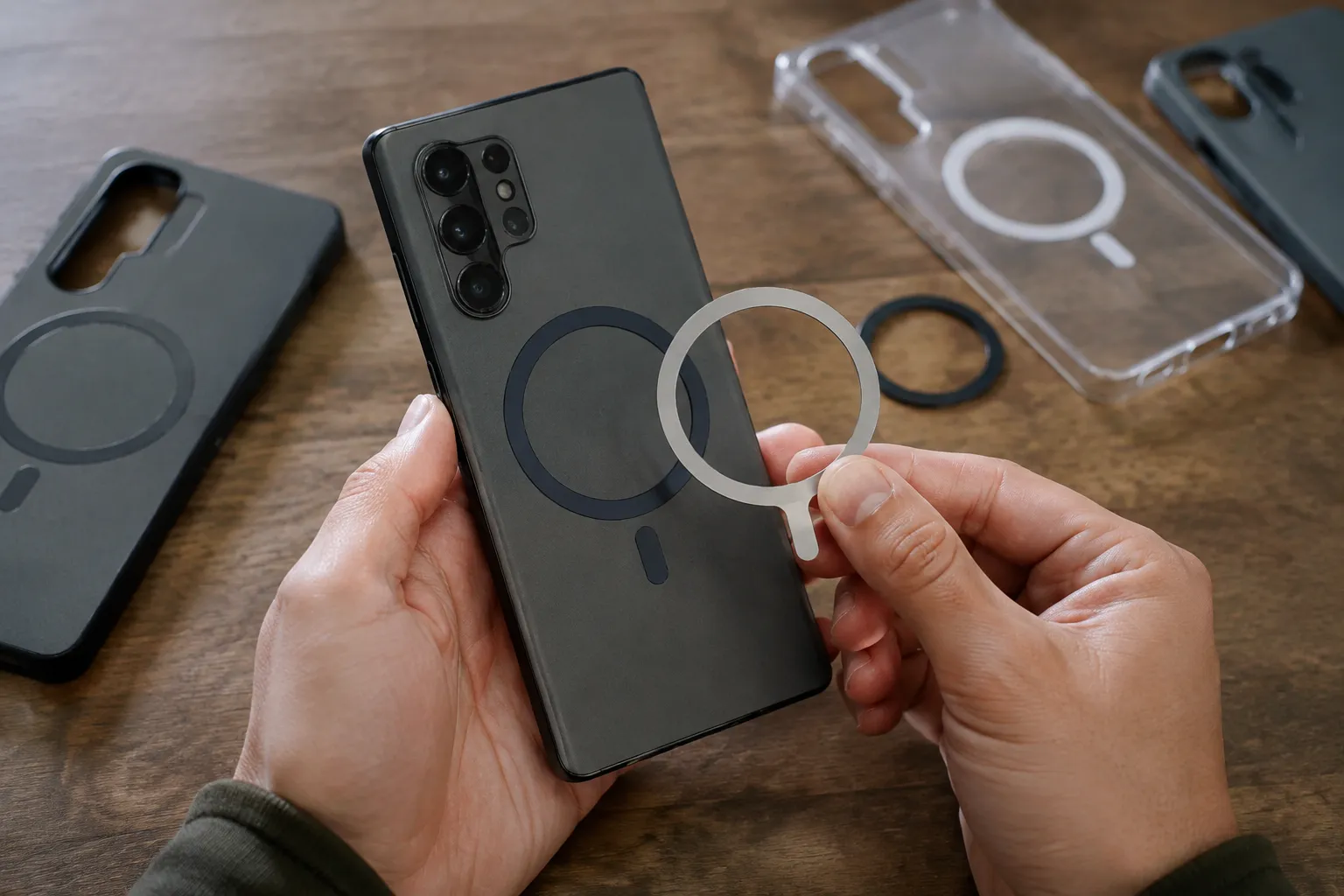
The answer is the alignment ring, a thin adhesive metal disc that sticks to the back of a phone or case and gives every magnet in the accessory ecosystem a target. Buy the wrong one and the charger wobbles, the phone heats up, and the whole setup feels like a promising idea that shipped too early. Pick the right one and the phone clicks into place with a satisfying snap that never gets old.
The Ring Is a Mechanical Problem, Not a Magnetic One
A magnet needs ferrous metal to grab. The back of a glass or plastic phone has none. The alignment ring supplies that metal in the form of a steel foil, usually about 56 millimeters across, and its only real job is to sit exactly where the accessory expects it to sit. That is it. The ring is not a magnet itself. It is a target.
Most people do not realize this until they hold two rings side by side. One is a bare steel disc, thin enough to flex in the fingers. Another has a visible adhesive layer. A third, marketed as a "magnetic ring," actually contains a ring of tiny magnets so the phone can stick to non-magnetic surfaces like a fridge or a metal desk mount. These are different tools. The plain steel ring is for charging. The magnetized version is for attachment, and it can interfere with charging if the geometry is off.
The word "alignment" in the product name does heavy lifting. A ring that is even a millimeter off center will make a wireless charger hunt for the coil. The phone will register the connection, then lose it, then reconnect. Some chargers blink an error light. Others just heat up quietly while charging at a third of the possible speed.
The 56 Millimeter Standard Is the Only Game in Town
Every serious alignment ring on the market, from the cheap no-name discs on Amazon to the nicer machined ones from accessory brands, conforms to the same outer diameter. That is 56 millimeters, the exact footprint of Apple's internal magnet array. The reason is simple: almost every magnetic charger and mount on earth is built to that spec because that is what iPhone owners buy. A ring that matched a different diameter would have no accessories to stick to.
This creates a strange situation for Android users. The phone has no internal magnets, or has magnets in a proprietary position, but the accessories all speak Apple's geometry. The alignment ring is the translator. It takes a phone that was never designed for magnetic charging and teaches it to sit properly on a charger that was designed for a different device entirely.
The outer diameter matters, but the inner diameter matters more. Wireless charging coils in phones sit slightly off center from the physical center of the device, and the coil position varies from model to model. A ring with a solid steel surface across the whole disc can block or distort the magnetic field that the charging coil needs. The best rings are hollow in the center, leaving the coil area clear of metal. This is why a ring with a large open center, often 42 millimeters or more inside, charges more reliably than a solid disc of the same size.
A person buying a ring should flip it over before installing. The hollow center is not a manufacturing shortcut. It is a functional requirement.
Thickness Separates the Good Rings From the Annoying Ones
Steel rings come in a range of thicknesses, usually from 0.5 millimeters to 1.2 millimeters. The difference sounds trivial. On a phone, it is not.
A 0.5 millimeter ring is nearly invisible under a case. It adds no perceptible bulge. The tradeoff is magnetic holding force. Thin steel saturates more easily, meaning the magnet in the charger grabs it firmly but not with the same tenacity as a thicker plate. On a desktop charger, where the device just sits there, thin is fine. In a car mount, where the phone bounces against a vent or a dashboard cradle, thin rings can lose grip on sharp bumps.
The 0.8 millimeter rings hit the sweet spot for daily use. They clear the raised camera bump on most phones when installed on a case, and they hold well enough to keep a phone on a magnetic mount through normal driving. Some cases have a recessed area or a subtle indentation in the middle of the back panel, and a thicker ring sits flush in that pocket.
The 1.2 millimeter rings are for people who prioritize grip above all else. They feel solid under the finger. They also create a visible lump under a tight case, and they can prevent some wireless chargers from making full contact because the phone sits too high off the pad. A 1.2 millimeter ring should be reserved for bare-back use with a strong mount, not for everyday charging.
Where the Ring Goes Depends on the Case
Installation is the step where most people sabotage themselves. Stick the ring in the wrong spot and the phone charges slowly or not at all. There is no repositioning after the adhesive bites.
For a bare phone, the target is dead center of the charging coil, and the coil is usually marked by the logo or a subtle etching on the back glass. Many phones have a small circle or a line printed near the center, and that mark aligns with the coil. The case manufacturer knows this, which is why a person should look for a case with its own alignment guide. Some cases, particularly those marketed as MagSafe-compatible, have a visible ring or a slight texture on the back that marks where the ring belongs.
On a case without a guide, the safe move is to find the coil location online for the specific phone model, mark it with a piece of removable tape, and then line up the ring's hollow center with that mark. Slapping the ring on the visual center of the phone is often wrong because the coil is rarely at the geometric center. The coil sits slightly lower on most devices, closer to the charging port than to the top.
A person who uses multiple cases needs a ring for each one. The ring does not transfer. Peeling a ring off a case and reapplying it to another is possible but leaves the adhesive weak and the alignment compromised. Rings are consumables. They cost a few dollars. Keeping a spare in a desk drawer is cheaper than wrestling a half-stuck ring off a slippery surface with a hairdryer and a plastic spudger.
Magnetized Rings Fix Mounts but Mess With Chargers
The magnetized alignment ring deserves its own category because it solves a different problem. A phone wearing a plain steel ring sticks to magnetic mounts and chargers fine. It does not stick to metal surfaces, because the ring is not magnetic. For a person who wants to slap the phone onto a metal locker, a fridge, or a magnetic dashboard plate, the phone needs the ring to carry its own magnets.
These rings, often called magnetic stickers or universal magnetic rings, contain 12 to 18 small permanent magnets arranged in a circle. They work beautifully for holding the phone onto any ferrous surface. They also fight with wireless charging. The magnets in the ring interact with the magnets in the charger, and if the ring's magnetic polarity is oriented wrong, the charger repels the phone instead of attracting it. Some of these rings are reversible, with a different polarity on each side, so a user can flip it to match the charger.
A person who wants both magnetic attachment and reliable wireless charging should buy two different rings: a plain steel one for charging and a magnetized one for mounting. Applying both is awkward, and stacking them changes the gap between the phone and the coil. In practice, most people pick one use case and accept the limitation.
Adhesive Quality Is the Hidden Spec
The cheapest rings use a basic acrylic adhesive that fails after a few hot days in a car or a few weeks of daily removal from a mount. The ring lifts at the edge, dust gets under it, and the phone starts sliding around on the charger. The better rings use a 3M VHB adhesive, which stands for very high bond. VHB is the same tape used to attach exterior trim to cars, and it does not let go without a fight.
Telling the difference from a product photo is impossible. The packaging usually mentions 3M or VHB in the fine print. A ring that markets its adhesive by name is worth the extra dollar. A ring that does not mention the adhesive at all is a gamble.
Surface preparation matters more than the adhesive grade. The back of a phone or case carries a thin layer of oils and dust that kills adhesion. Wiping the surface with an isopropyl alcohol pad, letting it dry completely, and then applying the ring with firm, even pressure across the whole disc for a full minute makes the difference between a ring that lasts a month and one that lasts a year.
Temperature matters too. Rings installed in a cold room often fail because the adhesive never reached its working temperature. Warming the back of the phone slightly with a hairdryer before application helps the adhesive flow into the microscopic texture of the surface.
The Real Test Is the Car Mount
Wireless charging on a desk is forgiving. The phone is stationary, the weight is distributed, and gravity helps. The car mount is where a ring earns its keep or reveals its weakness.
A magnetic car mount holds the phone vertically or at an angle, which means the full weight of the device pulls against the shear force of the magnet. A ring with a weak bond will slide down the mount slowly over the course of a drive. A ring with the wrong thickness will let the phone wobble over potholes. A ring with a hollow center that is too small will block the charging coil entirely, leaving the phone dead after a long commute even while sitting on a wireless charging mount.
The fix for the car is simple: test the setup at home before trusting it on the road. Place the phone on the mount, give it a firm tug, and see if the ring holds. Then plug in the charger and check whether the charging indicator stays solid while the phone is angled. If the connection blinks or drops, the ring's inner hole is not aligned with the coil. The phone needs to come off the case and the ring needs to be repositioned.
Some drivers find that a ring works fine horizontally but fails vertically, because the coil in the charger is also sensitive to orientation. This is rare with good rings and common with cheap ones. The cheap ring's magnets or steel composition is not consistent enough to hold proper alignment with the charger's coil when gravity is pulling sideways.
Heat Is the Silent Killer of Every Ring Setup
Wireless charging generates heat. The heat comes from the coil resistance and from the phone's charging circuitry, and it has nowhere to go on a glass-backed device. A metal ring sitting between the phone and the charger absorbs some of that heat and transfers it into the phone's back panel. Over a 30 minute charge session, the back of a phone with a ring can run noticeably warmer than a phone without one.
This is not a reason to skip the ring. It is a reason to avoid charging in direct sunlight, to remove a thick case before charging if the phone runs hot, and to avoid using the phone for heavy tasks while it is on a magnetic charger. A phone that charges slowly in the car while running navigation is not a ring problem. It is a thermal problem that the ring makes slightly worse.
The adhesive also suffers in heat. A phone left on a dashboard mount in summer sun can reach internal temperatures that soften the ring's bond. The ring slides down a few millimeters, the charging alignment shifts, and the phone starts its hunt for the coil again. Checking the ring's position after a hot day is a habit worth forming.
The Ring Is the Weakest Link, So Buy Two
No ring lasts forever. The adhesive degrades, the steel gets scratched, and the thin edge starts to peel after months of daily mounting and unmounting. When the ring fails, it takes the case with it, because pulling the ring off a case often tears a thin layer of the case material or leaves a residue that is difficult to remove.
Keeping a spare ring in a drawer is not paranoia. It is the practical acknowledgment that the ring is a replaceable consumable in a system that otherwise has no moving parts. A multi-pack of plain steel rings costs less than a single branded case, and the rings are model agnostic. A person who switches phones every two years can keep using the same rings, as long as the new phone has a coil in a similar spot.
The moment of truth comes when a phone slides onto a charger and clicks into place with a clean, centered snap. The ring has done its quiet job. The phone charges at full speed, the mount holds steady on a rough road, and the whole magnetic ecosystem feels the way the marketing promised. That click is the sound of a small, unglamorous piece of steel doing exactly what it was made to do.