
Shop Mous iPhone 17 Cases
Shop Mous Galaxy S26 Cases
Shop Mous Pixel 10 Cases
Shop AirPods Cases at Mous
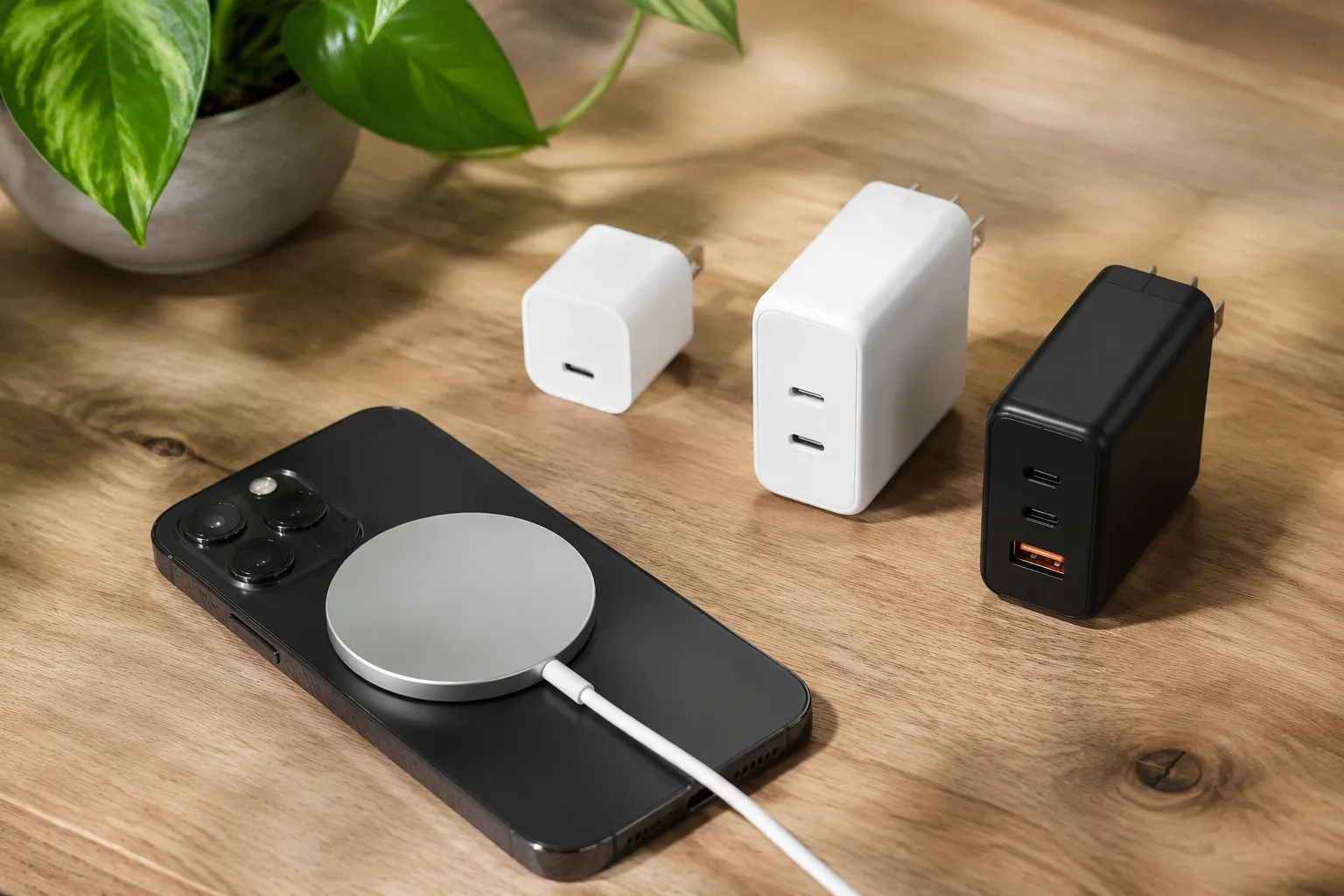
The white cable that ships inside the MagSafe charger box tells its own story, and the story is mostly about lawyers. Apple includes a one-meter USB-C cable and no power adapter at all, which nudges a person toward buying a 20-watt adapter, the smallest one that will run the charger at full speed. That 20-watt figure has become the default answer to every question about MagSafe power, and it is a fine answer for most people. It is also incomplete. The wattage conversation changes depending on what else sits on that desk, what kind of wall outlet exists nearby, and whether the phone charges alone or alongside a laptop, an iPad, or a pair of earbuds.
The confusion makes sense. Apple lists the MagSafe charger as capable of delivering up to 15 watts to an iPhone, but that number only appears when the phone runs iOS 16.1 or later, only with a compatible adapter, and only when the thermal conditions cooperate. Older iPhones cap at 7.5 watts through the same puck. An iPhone 12 or 13 plugged into a 20-watt adapter pulls 15 watts in ideal conditions, then drops the rate as the phone warms up, then slows further past 80 percent battery. The wattage printed on a brick is the ceiling, not the average, and a lot of the advice floating around treats that ceiling as if it were a constant.
What the wattage number actually controls
A wall adapter rated for 20 watts can supply up to 20 watts continuously. The MagSafe puck draws only what the phone requests at any given moment, so a 20-watt adapter is not forcing 20 watts into a phone at all times. The negotiation happens silently, dozens of times per second, between the puck and the device sitting on it. The puck asks for a voltage, the adapter agrees, and the phone decides how much current it can safely accept based on temperature, battery state, and whether the screen is on.
This is why a 30-watt adapter does not charge an iPhone faster than a 20-watt one. The phone simply never asks for more than 15 watts over MagSafe, so the extra headroom sits unused. A 65-watt laptop charger behaves the same way when a MagSafe puck plugs into one of its USB-C ports. The puck sees a capable source, negotiates for 15 watts, and ignores the rest. That particular scenario works flawlessly and deserves more attention than it gets.
The 20-watt recommendation exists because it is the smallest adapter that guarantees the full 15-watt wireless rate. A 12-watt adapter, the kind that shipped with older iPads, will charge a MagSafe iPhone but only at the slower 7.5-watt rate. The puck negotiates down to match what the source can provide. Nothing breaks, nothing errors out, but the charging curve stretches noticeably longer. A person in a hurry with a 12-watt brick and an empty phone should probably just use a cable.
The two-owner household, one puck, one outlet
The single most common real-world setup involves one MagSafe puck and one shared wall adapter. Two people each have an iPhone, and the puck sits on a nightstand or a desk between them. The natural instinct is to buy a second puck so both phones charge at once, which then requires a second adapter, which then requires either a second outlet or a multi-port brick.
A 30-watt dual-port adapter handles this cleanly. One port feeds the MagSafe puck at 15 watts while the other port charges a second phone through a cable at a similar rate. Most dual-port adapters from Anker, Belkin, and Ugreen split their output dynamically, so a 30-watt model can deliver 15 watts to each port simultaneously. That covers two phones with one wall outlet and leaves the MagSafe puck running at full speed.
Attempting the same trick with a 20-watt dual-port adapter creates a bottleneck. Splitting 20 watts across two ports typically yields around 10 watts per port, which drops MagSafe below its full rate and slows a cabled phone as well. The multi-port adapter math works differently than the single-port math. A 20-watt single-port adapter is adequate. A 20-watt dual-port adapter is a compromise.
When the puck shares a desk with a laptop
Laptop owners often discover that their MacBook charger has a USB-C port doing nothing while the MagSafe connector occupies the dedicated port. Plugging the MagSafe puck into the laptop's USB-C port works without issue on any MacBook charger rated 30 watts or higher. A 30-watt MacBook Air charger can feed the puck and run the laptop simultaneously, though the laptop will charge slowly while doing both. A 67-watt or 96-watt charger from a MacBook Pro handles the combined load without breaking a sweat.
The same logic applies to an iPad charger. The 20-watt adapter that ships with current iPads functions identically to the one Apple sells for MagSafe. Some older iPad chargers output 30 watts through USB-C, which also works perfectly. The puck does not care which logo sits on the brick, only that the brick can provide at least 15 watts over USB-C Power Delivery.
One caveat deserves attention. USB-C ports on laptops do not all behave alike. Some Dell and Lenovo business laptops expose USB-C ports that only transfer data, not power. Plugging a MagSafe puck into those ports yields nothing at all. Apple's laptops do not have this limitation, but a person traveling with a work-issued Windows machine should verify that the port supports power delivery before relying on it as a phone charger.
The thermal ceiling that wattage cannot fix
Wireless charging generates heat, and heat is the real enemy of fast charging, not wattage. The MagSafe puck itself contains magnets and a charging coil, and the iPhone contains its own coil. Power transfers across that gap inefficiently compared to a cable, and the lost energy becomes warmth in both the puck and the phone. When the phone's internal temperature sensors detect too much heat, the charging rate drops to protect the battery.
This explains why a phone charges slower on a hot day, or why using the phone while it sits on the puck slows the rate. The screen, the processor, and the wireless charging coil all generate heat simultaneously, and the phone prioritizes component safety over charging speed. A 20-watt adapter and a 65-watt adapter produce identical results in these conditions because the phone has already capped its intake well below 15 watts.
Apple's MagSafe charger includes a small internal fan in some versions, but the standard puck relies on passive cooling. Thick phone cases trap heat and slow charging further. A case with a hard plastic back or a wallet attached to the rear of the phone creates a thermal barrier that lowers the charging rate. Removing the case during charging is the single most effective way to maintain speed, more effective than buying a higher-wattage adapter.
The cheap adapter trap and the certification question
A person can buy a no-name 20-watt USB-C adapter from an online marketplace for a few dollars, and it will often work. The MagSafe puck will negotiate a connection, the phone will charge, and the whole setup functions until it does not. The risk hides in the electrical components that cost money to do properly. Cheap adapters sometimes use undersized capacitors, omit surge protection, or output noisy power that confuses the negotiation protocol.
The practical failure mode is usually intermittent. The phone charges for a while, then stops, then resumes, then stops again. The adapter's thermal protection kicks in because its internal components run hotter than they should. A person sees this behavior and blames the MagSafe puck, but the puck is simply responding to an unstable power source. Replacing the adapter with one from a recognizable brand resolves the issue immediately.
Certification matters more than wattage in this category. USB-IF certification means the adapter passed electrical safety and interoperability testing. Apple's own adapters obviously meet this standard, and reputable third-party brands like Anker, Belkin, and Ugreen certify their products as well. The certification is not a guarantee of perfection, but it eliminates the worst of the lottery.
The 30-watt sweet spot for most desks
For a person buying one adapter to serve a single MagSafe puck with some future flexibility, 30 watts represents the practical sweet spot. A 30-watt single-port adapter costs barely more than a 20-watt model, yet it can power the puck at full speed while simultaneously running a second device through a hub or a splitter. It can also charge an iPad Pro at a reasonable rate or top up a MacBook Air in a pinch, neither of which a 20-watt adapter can attempt.
The 30-watt class also aligns well with Apple's own recommendations for fast-charging iPhones through a cable. A phone plugged directly into a 30-watt adapter charges at the maximum cabled rate of around 27 watts for the Pro models, reaching 50 percent in roughly 30 minutes. The same adapter then switches to MagSafe duty at night. One brick, two jobs, no compromise.
Buying a 65-watt or 100-watt adapter for a single MagSafe puck wastes money and desk space. The larger adapters make sense only when they serve multiple devices simultaneously, such as a laptop, a phone, and a tablet sharing one GaN brick through multiple cables. A 100-watt adapter running one MagSafe puck is like owning a semi truck to move a bicycle.
The MagSafe Duo and the wattage that changed
Apple's MagSafe Duo charger introduced a separate wrinkle in the wattage discussion. The Duo charges an iPhone and an Apple Watch at the same time, but its power requirements differ from the single puck. Apple recommends a 27-watt or larger adapter for the Duo, and the device itself draws up to 23 watts when both positions are active. A 20-watt adapter runs the Duo but caps the iPhone portion at a lower rate.
The Duo example illustrates why reading the fine print matters. The wattage printed on an Apple product page often describes a maximum that requires specific accessories to achieve. The single MagSafe puck lists 15 watts, but that figure assumes a 20-watt or larger adapter with USB-C Power Delivery. The Duo lists 14 watts for the iPhone position, but only when the adapter supplies at least 27 watts total. A person who buys a 20-watt adapter for a Duo gets a slower experience than a person who buys the same adapter for a single puck.
Older iPhones and the 7.5-watt reality
An iPhone 12 or 13 running an iOS version older than 16.1 charges at 7.5 watts through MagSafe regardless of the adapter. Apple restricted the full 15-watt rate to newer software, meaning a person who never updates their phone leaves performance on the table. The same phone running current software charges at the full rate. This software-gated power delivery is unusual and frequently missed in forum discussions about charger wattage.
The practical consequence is that adapter wattage matters less for an older phone. A 12-watt adapter and a 30-watt adapter both charge an iPhone 12 stuck on iOS 15 at the same 7.5-watt rate. Upgrading the adapter before updating the phone produces no benefit at all. The sequence matters: update the phone first, then evaluate whether the adapter needs an upgrade.
Anyone using an iPhone 8, X, or 11 with a MagSafe puck should know that those phones lack the internal magnet array and the full wireless charging capability. They attach poorly or not at all, and they charge at the generic 7.5-watt Qi rate. The MagSafe puck works with them, but the experience resembles a standard wireless charger with extra steps. For those phones, adapter wattage is almost irrelevant.
Reading the actual numbers on the wall
The most reliable way to choose an adapter involves reading the labels on what already exists. Every USB-C adapter prints its output ratings somewhere on the brick. A label reading "5V/3A, 9V/2.22A, 15V/1.5A" describes a 20-watt adapter with Power Delivery profiles. The MagSafe puck negotiates the 9-volt profile at 2.22 amps to reach its full 15-watt output after internal conversion losses.
An adapter labeled "5V/3A" only, without the higher voltage profiles, cannot run the MagSafe puck at full speed. The puck requires a 9-volt negotiation to reach 15 watts. Some older adapters offer only 5-volt output, which the puck accepts but uses to deliver roughly 5 watts. That is enough to slowly charge a phone overnight but produces a frustratingly flat battery after a full day of use.
Checking the label takes ten seconds and eliminates most guesswork. If the adapter lists a 9-volt profile with at least 2.22 amps, it will run the MagSafe puck at full speed. If it lists 12-volt or 15-volt profiles but lacks the 9-volt figure, compatibility becomes uncertain. The puck can negotiate certain profiles, but not all of them are useful for wireless charging.
The cord that should not be forgotten
The cable connecting the adapter to the MagSafe puck carries its own wattage rating, and a poor cable undermines an otherwise correct setup. Apple's MagSafe puck ships with a permanently attached USB-C cable, so this matters only for extension cables or for people who use a USB-C hub between the adapter and the puck. A cable rated for 60 watts handles the MagSafe puck easily. A cheap cable rated for only 3 amps at 5 volts will choke the power delivery and force the puck to negotiate down.
Some USB-C hubs insert themselves into the charging path and introduce their own power limitations. A hub that passes through power at 15 watts while also carrying data will run the puck at reduced speed. The hub's specifications usually list its power delivery passthrough rating, and anything below 20 watts creates a bottleneck. For a permanent MagSafe desk setup, plugging the puck directly into the wall adapter avoids this entire category of problems.
The MagSafe puck itself draws about 15 watts at maximum, so any cable, hub, or adapter in the path must support at least that amount continuously. Intermittent charging, slow charging, or the puck getting warm without the phone charging all point to a bottleneck somewhere in the chain. Working backward from the wall outlet to the phone identifies the weak link in most cases.