
Shop Mous iPhone 17 Cases
Shop Mous Galaxy S26 Cases
Shop Mous Pixel 10 Cases
Shop AirPods Cases at Mous
The iPhone 12 was the first mainstream iPhone to ship with MagSafe, and everyone who bought an iPhone 8, X, XS, 11, or second-generation SE that year looked at the new magnetic back and felt a small pang of obsolescence. The feature itself was simple: a ring of magnets embedded behind the glass that snapped accessories into perfect alignment every time. No fiddling with a charging pad’s sweet spot. No wallet that slid out of a pocket. Apple framed it as a convenience upgrade, but for anyone holding a perfectly good older phone, it read as a quiet cutoff. The hardware would not get the ring. The question has never been whether the old phones can physically charge wirelessly, because they can. The question is how much work a person is willing to do to approximate the experience Apple designed only for newer devices.
The older iPhones support standard Qi wireless charging, so any plain Qi pad will charge them fine. What those phones lack is the magnetic alignment. A regular pad requires the user to lay the phone down carefully, check that the charging indicator lit up, and then resist the urge to check a notification, because moving the device two millimeters kills the connection. MagSafe solved that with magnets, and it also introduced a faster 15-watt charging rate for the phones that supported it. The older devices are capped at 7.5 watts over Qi. So any solution for an older phone has two separate jobs: recreate the magnetic snap, and possibly deal with the slower charge speed.
The Stick-On Ring Is the Foundation, Not the Whole Answer
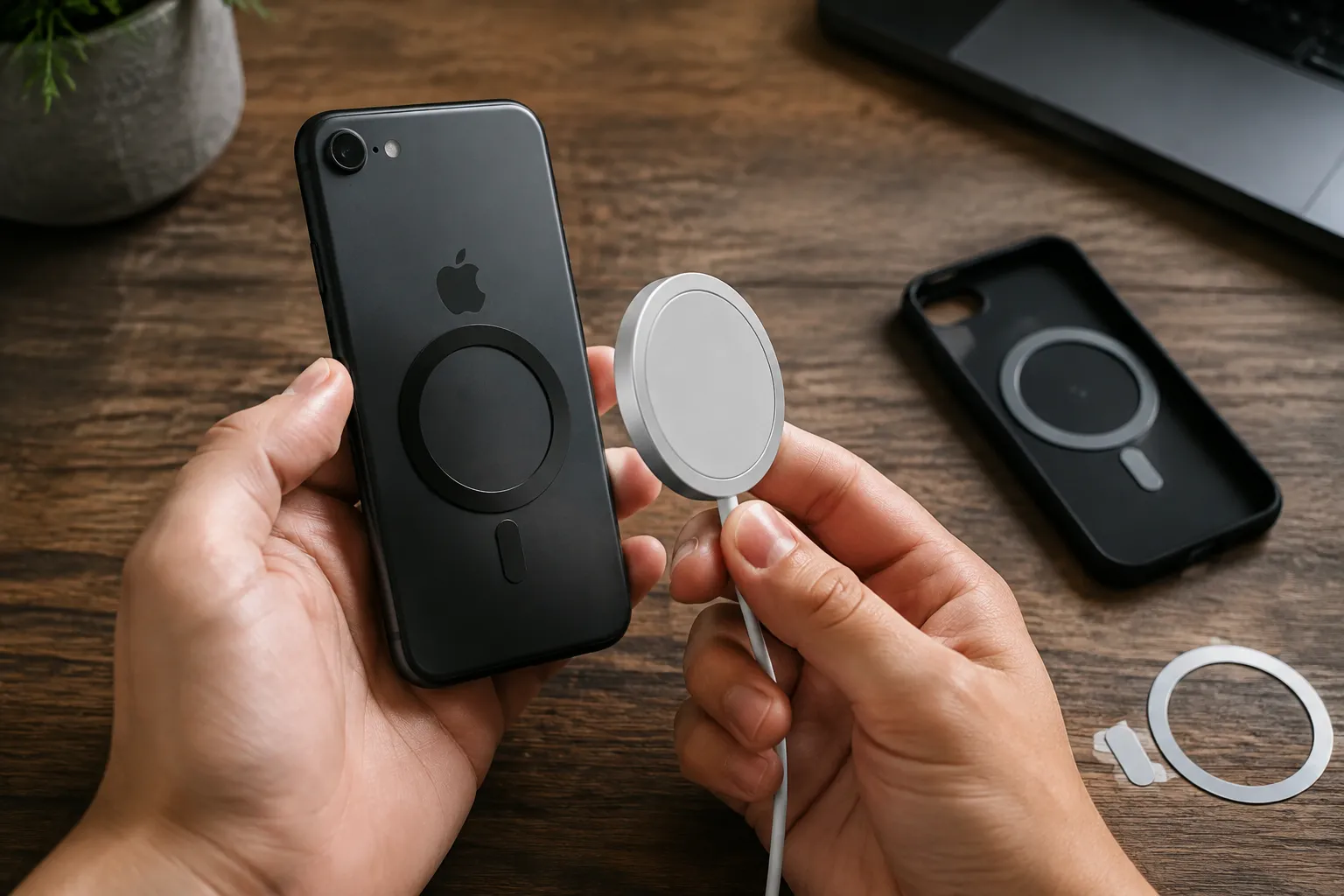
The most direct fix is a metal ring with adhesive on one side. The ring is basically a thin piece of steel or iron that sticks to the back of the phone or to a case, and the MagSafe accessory’s built-in magnets grab onto it. These rings cost a few dollars and come in bulk packs. They work for two purposes: holding a magnetic wallet or car mount, and aligning a MagSafe charger to the Qi coil hidden inside the phone.
The crucial detail is placement. The Qi charging coil inside an iPhone 8-era device is not centered the same way it is on a 12 or newer. On newer phones, the MagSafe magnet ring was engineered to sit exactly over the coil. On older phones, the user has to line up the ring with the coil’s actual position, which is roughly in the upper-middle area of the phone’s back, just below the camera bump. A person who slaps a ring on dead-center will find the charger snaps on perfectly but charges at a glacial pace or not at all, because the coil inside the charger and the coil inside the phone are not aligned.
The standard trick is to place the phone face-up on a flat surface, lay a MagSafe charger on top of it, and let the phone begin charging. Then, without lifting the charger, slide the metal ring over the back of the phone, using the charger’s position as a guide. Once the ring is down, the charger will click into place on the next attempt. This method works because it uses the charger itself as a physical template for where the coil lives.
A Case Changes Every Calculation
The ring solution gets complicated when a case enters the picture. A thin plastic or silicone case adds a layer between the ring and the charger, and most standard cases are too thick for the magnetic grip to hold securely. Apple’s own MagSafe chargers have a specific magnetic strength calibrated for a bare phone back or Apple’s own MagSafe cases. A generic ring stuck to the outside of a thick rugged case will often hold the charger in place, but only tenuously, and any slight bump sends the charger sliding off.
The better move is to install the ring between the phone and the case, which means sticking it directly to the phone’s glass back and then sliding the case over it. This preserves a clean exterior and keeps the case’s thickness from pushing the magnets too far away. But it requires a case with a smooth, non-textured interior, and it means committing to that case forever, because the ring now lives on the phone itself. A person who swaps cases often will need a ring on every case, or a ring on the phone and a collection of cases thin enough to work through.
Some case manufacturers sell cases with the magnet ring built into the case’s back panel. These are sold as “MagSafe-compatible” cases for older iPhone models, and they are the cleanest solution for someone who wants the snap without the DIY adhesive work. The ring is sewn or molded into the case, aligned correctly for that specific phone model, and the case itself is usually thin enough to preserve magnetic strength. The tradeoff is choice. The selection of such cases for an iPhone 11 or older is far smaller than the selection for a 15 Pro, and the options tend toward basic black silicone or clear plastic.
The Charging Speed Reality No One Mentions
Even with perfect alignment, an older iPhone will not charge at MagSafe speeds. The 15-watt rate is gated by software and hardware on the phone side. An iPhone 11, X, or 8 simply will not pull more than 7.5 watts from a Qi charger, magnetic or not. The result is that a person with an older phone and a MagSafe charger gets the convenience of the snap and the alignment, but the actual charging time stays roughly the same as it was with a dumb Qi pad.
This matters more than most buyers expect. A modern iPhone on a MagSafe charger gains roughly 50 percent charge in 30 minutes. An iPhone 11 on the same charger, with the ring alignment, gains maybe 30 percent in the same window. For overnight charging, none of this matters. For a quick top-up before heading out the door, the difference is meaningful. Anyone considering this upgrade path should know that the convenience improves but the speed does not. The charger itself is not the bottleneck; the phone is.
The one exception is the iPhone 12 generation and newer, which support the full 15 watts. Older phones do not. And no third-party charger or ring accessory can unlock that speed, because the limitation is in the phone’s power management hardware. Anyone selling a “fast charging” ring or claiming full MagSafe speeds for older phones is describing a thing that physics will not allow.
Car Mounts Are Where the Ring Earns Its Keep
Charging aside, the magnetic ring transforms the car mount experience more than any other accessory. A vent mount or dashboard mount with a magnetic backplate has existed for years, but those required a metal plate stuck inside a case or on the phone’s back, a plate that often interfered with Qi charging because it sat directly between the phone and the charger. MagSafe accessories solve this differently. The charger puck itself is the mount. A person plugs a MagSafe charger into a car vent mount, and the phone snaps onto the charger, aligning the coil while simultaneously holding the phone in place.
For an older iPhone with a stick-on ring, this setup works beautifully. The ring gives the charger something to grab, and the charger does double duty as the mount. The phone does not slide around during hard braking, and the alignment is guaranteed every time because the magnets center the charger over the ring, which the user positioned over the coil. The charging speed limitation still applies, but in a car, maintaining a charge during navigation is usually the goal, not achieving a fast full charge.
The failure mode appears with heavy phones. An iPhone 11 Pro Max with a battery case attached is heavy, and the magnetic hold from a ring is weaker than the hold from a native MagSafe phone. On rough roads, the phone can vibrate loose. The fix is a case with a built-in ring that sits flush and provides more surface contact, or accepting that the magnetic mount in a car works best for standard-weight phones without chunky cases.
Wallets and the Problem of Steel
MagSafe wallets are the accessory that looks great in Apple’s marketing and frustrates people in practice. The iPhone mini and standard models hold a wallet with cards in it reasonably well. The Pro Max models struggle because of weight. An older phone with a stick-on ring faces the same physics, with an added wrinkle. The ring is usually solid steel or a steel alloy, and while it is great for attracting magnets, it also blocks the phone’s NFC antenna in some positions.
The NFC antenna on older iPhones sits near the top of the phone, around the camera area. A ring placed over the coil sits lower, so most ring placements do not interfere with Apple Pay. But those magnetic wallets that snap on the back can position cards directly over the NFC area if the wallet is large. A person with an older phone and a magnetic wallet will occasionally find Apple Pay failing at the terminal, requiring the wallet to be pulled off before the phone will read. This is a known annoyance, not a dealbreaker, but it is worth knowing before buying a magnetic wallet for an older phone.
The alternative is a wallet that attaches differently. Some stick-on rings come with a small metal circle that fits on the outside of a wallet, turning any slim card holder into a magnetic one. That approach keeps cards away from the phone’s internals entirely, and the whole stack snaps together. The downside is bulk, because now the phone, the ring, the wallet, and the metal disc form a sandwich that is noticeably thicker than a native MagSafe wallet setup.
Desk Charging Stands and the Angle Game
The other major MagSafe accessory category is the desk stand. These range from simple angled pucks to elaborate multi-device docks, and they all rely on the same principle: the phone sticks to the charger, and the charger is tilted at a viewing angle. For an older phone with a ring, this works, but the angle matters. A stand designed for a native MagSafe phone assumes the phone’s weight is distributed a certain way. An older phone with a ring and a case shifts that balance, and some stands will tip forward or refuse to hold the phone at the advertised angle.
Heavy-duty stands with a wider base handle this fine. Lightweight stands that clamp onto a desk edge or use a suction cup can struggle. The practical advice is to buy a stand with an adjustable angle and a weighted base, and to test it with the phone’s actual case installed before assuming the magnetic hold is sufficient. The ring on the back of the phone does not change how much the phone weighs, and a heavy iPhone 11 in a thick case will defeat a flimsy magnetic stand every time.
There is also the bedside angle. A MagSafe stand that holds the phone vertically makes a decent nightstand clock. An older phone with a ring can do the same, provided the charger is plugged into a power source and the phone’s screen is set to stay on. The charging speed is irrelevant overnight. The convenience is waking up to a phone that did not slide off the stand at 3 a.m.
Which Older Phones Are Worth the Effort
The ring-and-case solution makes sense for some phones and not others. An iPhone 11 or 11 Pro still has a capable processor, a good camera, and several years of iOS updates ahead. Spending $15 on rings and a MagSafe charger to keep that phone useful is a reasonable move. An iPhone 8 or X is a harder sell. Those phones are older, their batteries degrade faster, and their A11 and A12 chips struggle with current iOS versions. Buying MagSafe accessories for a phone that may be replaced within a year is throwing good money after a dying battery.
The second-generation iPhone SE is the odd case. It has the A15 chip, the same one in the iPhone 13, and will receive updates for years. But it retains the older iPhone 8 chassis with no MagSafe. For SE owners, the ring solution extends a genuinely modern phone’s usability with a tiny investment. The SE charges slowly over Qi regardless, but the magnetic convenience for car mounts and desk stands makes the phone feel far more current than its 2017-era body suggests.
The first-generation iPhone SE from 2016 and the iPhone 6s and 7 generation are not worth the effort. Their Qi charging support is limited to models that had it, which means the 6s and 7 do not support wireless charging at all without a case that adds a receiver coil. Those receiver cases exist, but they are thick, ugly, and produce so much heat that they damage battery health over time. A person with one of those phones should skip the entire MagSafe conversation and buy a cable.
Battery Health and the Heat Problem
Wireless charging generates heat. MagSafe charging generates more heat than standard Qi because the higher wattage pushes more power through the coil. Older phones with degraded batteries are more sensitive to that heat. Apple’s battery health management software on iOS 13 and later throttles charging when the battery gets warm, which means an older phone on a MagSafe charger might click on, charge for ten minutes, and then slow to a trickle as the phone protects its aging battery.
The magnetic ring itself does not make this better or worse. The heat comes from the charging process, not the alignment. But a person with an older phone who uses a MagSafe charger should expect the phone to run warmer than it would with a cable, and should avoid charging on soft surfaces like a bed or couch where heat has nowhere to go. The phone’s battery health percentage will drop faster over months of wireless charging than it would with wired charging. This is the hidden cost of the convenience, and it applies to every wireless charger, not just MagSafe.
A final note on the rings themselves. The cheap ones from online marketplaces are usually bare steel and can scratch a phone’s glass back if dust gets trapped underneath. The slightly more expensive ones come with a microfiber backing and a stronger adhesive. The difference is real. A ring with weak adhesive will peel off in a hot car, taking the charger with it. Spending a few extra dollars on a branded installation kit with alignment tools saves a great deal of frustration. For a small piece of metal, the quality range is surprisingly wide, and the cheap end of that range is genuinely poor.
The whole endeavor is a workaround, a way to bolt a modern convenience onto hardware that predates it. It works. A person with an iPhone 11 and a $15 ring kit can have the magnetic snap, the car mount, and the desk stand that make newer phones feel effortless. The phone will charge slower, run a bit warmer, and require a moment of careful alignment during installation. But for someone who likes their current phone and wants a few of the new tricks, the ring closes most of the gap. It just does not close all of it, and pretending otherwise is how people end up with a charger that snaps on perfectly and never actually fills the battery.